Before you begin
Who: ProMEX admins: the owner, the approvers and reviewers. Where: https://admin.lightsea.io. Tests: PT-01 to PT-10, ON-04, ON-05.
You need: Chrome, your ProMEX email address and, if you are an approver, the wallet (Kastle, KasWare or Kaspire) that holds your approver key.
The dashboard is where ProMEX checks suppliers, reviews deposits, signs mints (the creation of new tokens), completes retirements and redemptions, and keeps the reserves honest. Everything a supplier or holder does in the app shows up here. Everything decided here shows up for them.
1. Sign in
- Open https://admin.lightsea.io.
- Enter your ProMEX email.
- Enter the code you receive. On testnet today the code is fixed at 123456 (known issue F2). Real emailed codes will replace it before the team gets access.
- Check the top right: it shows your name and role (Owner, Approver or Reviewer).
Signing in and out is test PT-01.
Accounts on testnet:
| Role | |
|---|---|
| anuragsingh@promex.io | Owner |
| guido.glowania@promex.io | Approver |
| mark.ho@promex.io | Approver |
2. The tabs
| Tab | What waits there | Guide | Test |
|---|---|---|---|
| Deposits | Supply requests: review, recommend, mint | 2, 3 | PT-03 |
| Suppliers | Business details to check | 2 | PT-04 |
| Retirements | Tonnes retired on Kaspa that ProMEX must now retire at the registry (target: 5 business days) | 4A | PT-05 |
| Redemptions | Holders taking tonnes out to their own registry account | 4B | PT-06 |
| Reserves | Whether the tokens in circulation match the tonnes in ProMEX's registry accounts | below | PT-07, ON-05 |
| Settings | Your approver key, notifications, devices | below | ON-04, PT-09 |
Every list has:
- a counter of what is waiting on ProMEX;
- filter tabs, each with a count;
- a Refresh button.

3. Reserves
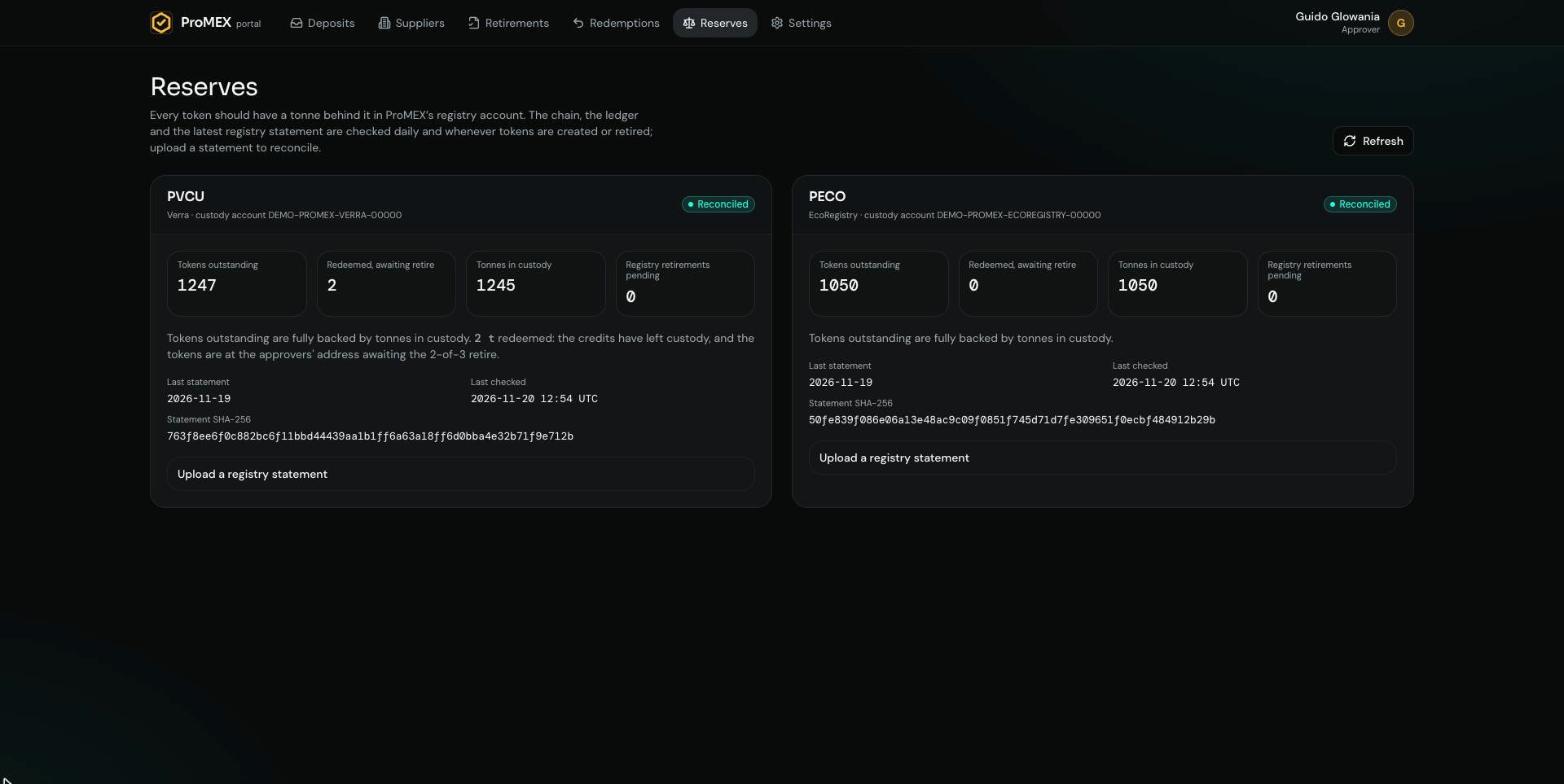
Each token has a card with four figures:
- Tokens outstanding: the tokens that exist on Kaspa.
- Redeemed, awaiting retire: tonnes redeemed and waiting to be retired.
- Tonnes in custody: tonnes held at the registry.
- Registry retirements pending.
Reconciled means three records agree: the tokens on Kaspa, ProMEX's own ledger, and the latest registry statement. Press Upload a registry statement to check against a new statement. The public Reserves page in the app shows the same figures.
What to check
Test PT-07. Upload a statement whose total is wrong on purpose. The card must say which check failed, in plain words.
4. Settings · your approver key
Approvers sign mints and retirements with their wallet. Before you can sign, register that wallet here. It must be the wallet whose key is one of the token's three approver keys.
- Open Settings.
- Under Approver key, press your wallet: Kastle, KasWare or Kaspire.
- Approve the signature request in your wallet.
- The card shows Registered and your wallet address.
A wallet whose key is not one of the token's approver keys is refused (test ON-04).
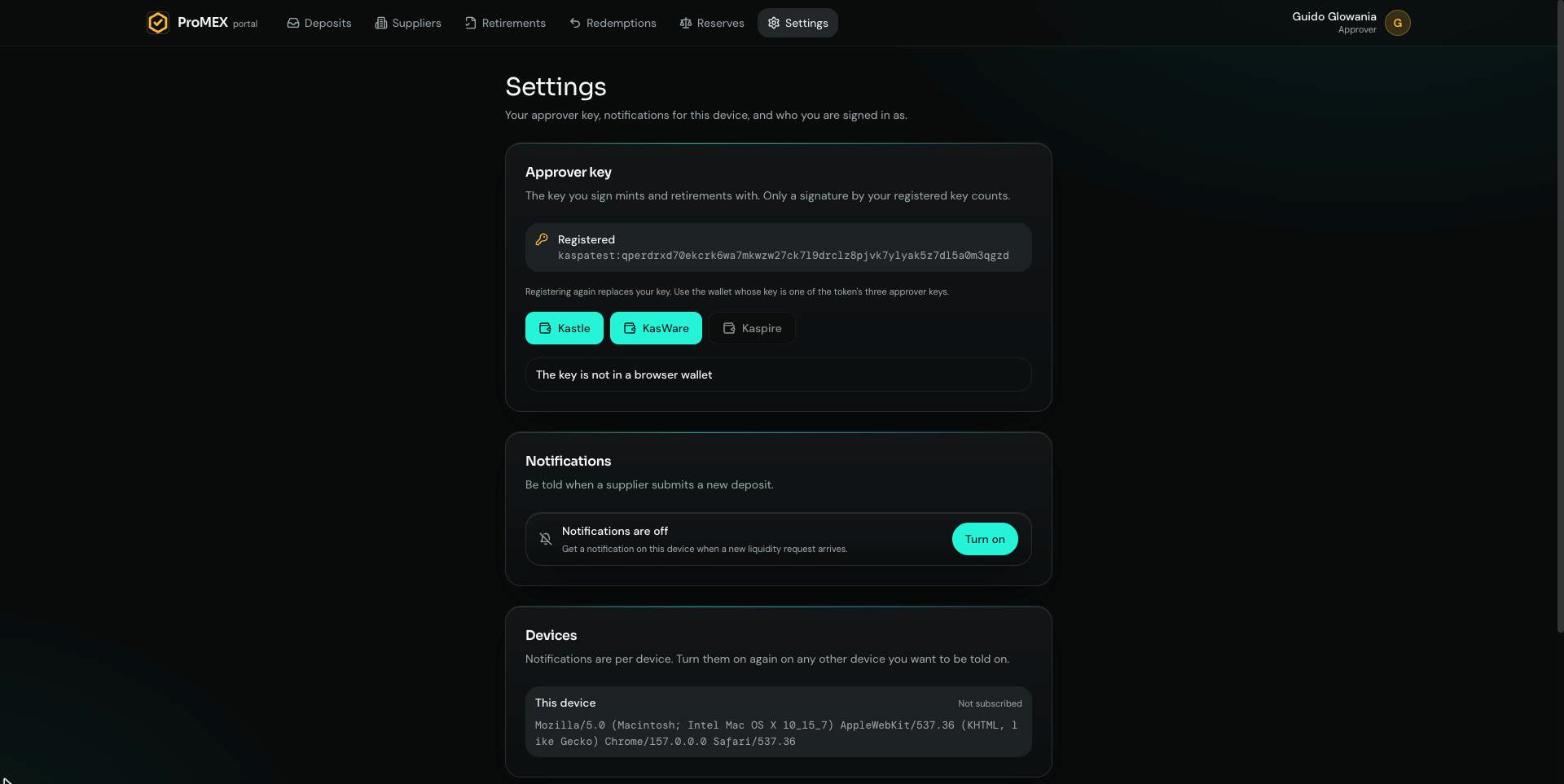
Notifications: press Turn on to be told on this device when a supplier files a new deposit (test PT-09). Notifications are set per device.
5. Who can do what, and how many signatures each action needs
The three roles
| Role | What they can do |
|---|---|
| Reviewer | Read everything and add notes. Cannot decide. |
| Approver | Decide. Today an Approver has the same powers as the Owner. |
| Owner | Decide. The same powers as an Approver (the owner is not "approver plus one"). |
ProMEX creates the accounts. There is no sign-up.
The two kinds of approval
| Kind | What happens | Wallet signature? |
|---|---|---|
| Decision | One person, signed in to the dashboard, presses the button. | None |
| 2-of-3 signature | Two of the token's three approver keys must sign. The two must be different people, each signing with their own registered approver key in Kastle, KasWare or Kaspire. The first signature is saved; the second one sends it to Kaspa. The same person can't sign twice. | Two, from two people |
Each admin, for themselves
| Action | Where | What it needs |
|---|---|---|
| Sign in | Sign-in page | the emailed code (fixed at 123456 on testnet today, known issue F2) |
| Register your approver key | Settings | one signature in your wallet; the wallet's key must be one of the token's three approver keys |
| Turn on notifications | Settings | nothing; once on each device |
Any admin: one action, no wallet signature
| Action | Where | What it needs |
|---|---|---|
| Complete a retirement at the registry (serials, reference, certificate) | Retirements | one action, no wallet signature (the holder already destroyed the tokens) |
| Record the registry transfer of a redemption | Redemptions | one action, no wallet signature |
Approver or Owner only (a Reviewer can only read and add notes)
| Action | Where | What it needs |
|---|---|---|
| Verify, ask for more, or reject a supplier | Suppliers | one decision |
| Recommend, ask for more, or reject a deposit | Deposits | one decision |
| Prepare the mint | Deposits › the deposit › Mint | nothing to sign: it gets the mint ready for the two signatures |
| Approve or reject a redemption | Redemptions | one decision |
| Prepare the retirement of redeemed tokens | Redemptions › Retire the held tokens | nothing to sign: it gets the retirement ready. It must pay the holder's 1 KAS back, or it can't be signed. |
| Cancel an approved redemption before anything was sent | Redemptions › Cancel the redemption | one decision, with a reason the holder reads (it also cancels itself after 14 days) |
| Put a redemption back to approved when the reported send never arrived | Redemptions › Nothing arrived? | one decision |
| Upload a registry statement, re-check reserves | Reserves | one action |
Two different approvers: 2-of-3 signature (each with their own registered key)
| Action | Where | What it needs |
|---|---|---|
| Mint the tokens | Deposits › the deposit › Mint | 2 of 3 approver keys; refused while the reserves don't reconcile |
| Retire the held tokens | Redemptions › Retire the held tokens | 2 of 3 approver keys |
| Return the tokens to the holder when a received redemption can't go ahead | Redemptions › Return to the holder | 2 of 3 approver keys; not possible once the credits were transferred at the registry |
The approver keys on testnet today. PVCU and PECO each have three:
- key 0: the owner's Kastle wallet;
- key 1: Guido's key. It isn't in a browser wallet, so it signs through a developer's tool, not Kastle;
- key 2: a spare test key.
Any two of them make a valid mint or retirement.
On mainnet (the live network), the three keys are fixed when the tokens are created. The people who will approve must give their wallet keys before then.
Sign in with each role and record what you actually see under test PT-02.